
Who is responsible for what in IaaS, PaaS and SaaS: Microsoft, AWS and Google Cloud models from official sources, plus questions to decide.
Introduction
When a company says "let's move to the cloud", one question often goes unasked: who is in charge of what once the applications are there?
Choosing between IaaS, PaaS and SaaS isn't only a technical decision. It's a decision about responsibility: which part of the infrastructure, the operating system, security and data stays with you, and which with the provider. That choice shapes cost, delivery speed and how many people you need to operate it.
This article looks at what changes in each model according to the official documentation from Microsoft, AWS and Google Cloud, which responsibilities are never delegated, and what each layer means in practice: identities, patching, networking, encryption and key management, logging, and backup. Numbers in square brackets point to the sources at the end. Anything that is Nubyron's own judgment rather than a provider standard is labelled [Nubyron view].
The three models in one sentence each
Two caveats worth keeping in mind:
The shared responsibility model
Each provider presents it in a different format. Read all three before generalizing, because they are not equivalent layer by layer.
Microsoft: a layered matrix
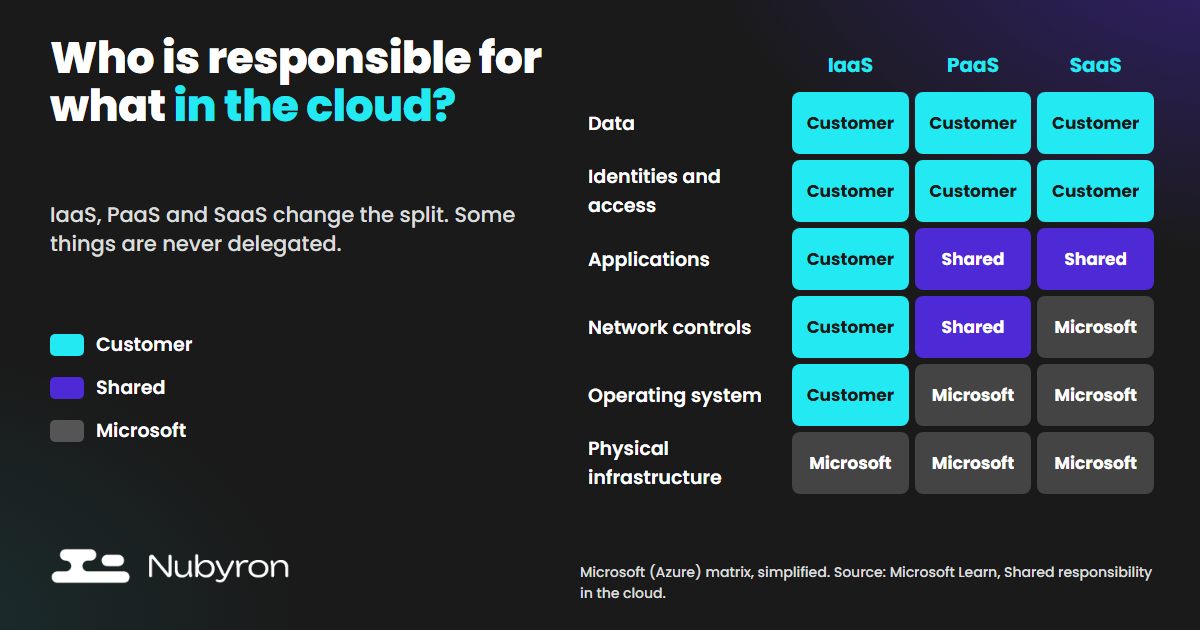
This is Microsoft's matrix. (The documentation also has an "On-premises" column where everything is the customer's; we leave it out here.)
| Responsibility area | IaaS | PaaS | SaaS |
|---|---|---|---|
| Customer data | Customer | Customer | Customer |
| Configurations and settings | Customer | Customer | Customer |
| Identities and users | Customer | Customer | Customer |
| Client devices | Customer | Customer | Shared |
| Applications | Customer | Shared | Shared |
| Network controls | Customer | Shared | Microsoft |
| Operating system | Customer | Microsoft | Microsoft |
| Physical hosts | Microsoft | Microsoft | Microsoft |
| Physical network | Microsoft | Microsoft | Microsoft |
| Physical datacenter | Microsoft | Microsoft | Microsoft |
Source: Microsoft Learn, "Shared responsibility in the cloud" [1]. Microsoft uses "responsibility" in a governance sense and presents the table as illustrative guidance that doesn't modify any agreement between you and Microsoft.
AWS: security "of" the cloud, security "in" the cloud, and three kinds of control
AWS splits security into "of" the cloud (AWS protects the infrastructure that runs all its services: hardware, software, networking and facilities) and "in" the cloud, where the customer's responsibility depends on the services they choose, how those services are integrated into their environment, and the laws and regulations that apply to them [2].
It doesn't publish a layered matrix; it classifies controls instead: inherited (the customer fully inherits them, such as physical controls), shared (they apply to both the infrastructure and the customer: for patching, AWS patches the infrastructure and the customer patches their guest OS and applications) and customer-specific (they depend solely on their application) [2]. Two examples [2]:
Google Cloud: shared responsibility and "shared fate"
Google describes the split by model: with IaaS, "the bulk of the security responsibilities are yours"; with PaaS you share application-level controls and IAM management; with SaaS you remain responsible for your access controls and the data you store; and across all models, for your access policies and data. It adds the concept of "shared fate", an ongoing partnership to improve security [3]. The page is dated 2023: it states principles, not product-level detail.
What the three have in common
All three agree on the essentials: the provider answers for the infrastructure; the customer answers for their data and for access control. They differ in format and level of detail. That is why the table above is Microsoft's matrix and we call it that: applying it as-is to AWS or Google would be inaccurate.
What is easy to forget: some things are never delegated
Look at the first three rows of the table: data, configuration and identities belong to the customer in all three models. Microsoft puts it this way: whatever the deployment type, you always retain responsibility for [1]:
The table marks client devices as "Shared" for SaaS even though the text says you always retain responsibility for endpoints: in SaaS, Microsoft may provide device management capabilities, but endpoint protection and compliance remain yours [1].
In other words: even if you buy the most "managed" service on the market, a user without MFA or an excessive permission is still your problem.
What it means in practice
By model
If you choose IaaS. Maximum control and maximum work. On Azure you configure all network security, including firewalls and segmentation, and you are fully responsible for the applications you deploy [1]; on EC2, you own the guest OS, the installed software and the security group [2]. Patching is the classic example: AWS classifies it as a shared control, in which AWS patches the infrastructure and the customer patches its guest OS and applications [2]. [Nubyron view] If nobody owns that task, nobody does it.
If you choose PaaS. You gain speed: you stop managing machines and the operating system [1]. The application and the network controls become shared; application configuration, code security and access controls stay with you [1]. Further down you will see that "OS: Microsoft" doesn't mean "nothing left to patch".
If you choose SaaS. Microsoft manages the network and the OS, and the application is a shared responsibility [1]. Your data, accounts, access and configuration remain yours.
Layer by layer
Six layers, with the essentials of each and its source. Coming next: one article per layer (identities, patching, networking, encryption and keys, logging, and backup).
Identities and access. Identities are the customer's in all three models [1]. Microsoft is phasing in mandatory MFA on the Azure management plane: from October 2024 on the Azure portal and the Entra and Intune admin centers, and from 1 October 2025 (gradual rollout) on CLI, PowerShell, IaC and the REST API for create, update or delete operations. Workload identities aren't affected, but user accounts used as service accounts are, and Microsoft recommends migrating them to workload identities [4]. That MFA doesn't cover your own applications [4]. On AWS, best practice is federation and temporary credentials for people, roles for workloads, MFA and least privilege [5]. In PaaS, Microsoft recommends keeping secrets in Key Vault rather than in app settings [6].
Guest OS and runtime patching. On IaaS, patching is yours: Azure Update Manager schedules it in customer-defined maintenance windows [7]; AWS Patch Manager uses baselines you define, doesn't test patches, and being "compliant" doesn't mean being secure [8]. On PaaS, Azure patches the App Service OS monthly [9], but major and minor runtime versions are installed side by side and moving your app to them is up to you [9]. OS patching goes away; the lifecycle of the runtime and of your dependencies does not [1][9].
Network. On Azure, network security groups come with DenyAllInbound, but also AllowVNetInBound, which allows all traffic inside the virtual network: internal segmentation is your job [10]. An AWS security group is a stateful firewall where only what its rules allow gets through [11]. On PaaS you configure application-level controls (private endpoints, access restrictions, WAF), and HTTPS redirection in App Service is not on by default [1][6]. On S3, AWS recommends turning on Block Public Access at account level [12].
Encryption and keys. Encryption at rest is already handled in storage: Azure Storage always applies it and you can't turn it off [13], managed disks use platform-managed keys by default [14], Azure SQL turns on TDE for new databases [15], and S3 has encrypted every new upload with SSE-S3 since 5 January 2023 [16]. What you decide is control of the key: with customer-managed keys (Azure Key Vault or Azure Key Vault Managed HSM), rotation is yours [13]. [Nubyron view] That decision should be written down before production, dataset by dataset, following the data classification that Microsoft places in the customer's hands [1].
Logging and audit. On Azure, the Activity log is automatic, but resource logs are not collected by default: you need a diagnostic setting [17]. On AWS, CloudTrail Event history keeps only 90 days of management events and excludes data events; for more you need a trail or an event data store [18]. Destination, retention and alerting are your decisions.
Backup and recovery. On an Azure VM, Azure Backup runs on the schedule you specify [19]. Azure SQL Database takes automatic backups, with point-in-time restore of 7 days by default (configurable from 1 to 35); long-term retention is not enabled by default [15]. In DynamoDB, point-in-time recovery is disabled until you enable it [20]. "Managed" doesn't mean that retention, redundancy and restore testing meet your requirements; Microsoft suggests testing restores [15].
VM versus managed service, in one table
| Task | On a VM (IaaS) | In a managed service (verified examples) |
|---|---|---|
| OS patching | Yours: Update Manager [7], Patch Manager [8] | Provider's: App Service, monthly [9] |
| Runtime and dependencies | Yours | Runtime patches depend on the stack; major and minor versions and dependencies are yours [9][1] |
| Network | Filtering and segmentation are yours [10][11] | Provider baseline; application controls yours [1][6] |
| Encryption at rest | Managed disks with platform-managed keys by default; customer-managed keys optional (Key Vault or Managed HSM) [14] | On by default and not disableable in Azure Storage and S3 [13][16]; key control is yours |
| Logging | You configure it | Provider generates it; destination, retention and alerts are yours [17][18] |
| Backup | You schedule and test [19] | Automatic in Azure SQL; in DynamoDB, PITR is off until you enable it [15][20] |
| Identities | Yours | Yours; in PaaS, also managed identities and the management plane [1][6] |
How to decide: questions before choosing
The official documentation describes how responsibility is split. It doesn't tell you which model suits you. [Nubyron view] These are the questions we find most useful. They are not a standard and they don't come from the providers:
1. How much time and how many people can we dedicate to operations? Every layer you manage means patching, monitoring and on-call duty. Without a team, IaaS carries a hidden cost.
2. Do we really need that control? "We want full control" is valid when there is a concrete need (an operating-system dependency, a technical requirement). Otherwise you pay in effort for control you never use.
3. What compliance requirements do we have? AWS reminds customers that their responsibility varies with the services chosen, how they are integrated and the applicable laws and regulations [2]. [Nubyron view] A certified provider doesn't make your own configuration compliant.
4. Who owns each piece? Every component should have a named person or team.
5. What total cost are we comparing? The service bill plus the cost of operating it. Managed doesn't mean free, and self-managed doesn't mean cheap.
Six common mistakes (and how to avoid them)
All of these are [Nubyron view]; the facts they rely on carry their source.
1. Assuming that with PaaS or SaaS "there is nothing left to manage". Data, identities, configuration and access are still yours [1].
2. Running IaaS without a patching owner. Patching is a shared responsibility, and the provider does not cover the customer's part [2].
3. Confusing "no OS to patch" with "no lifecycle to maintain". In PaaS, you migrate major and minor runtime versions and your code's dependencies yourself [9][1].
4. Assuming "encrypted by default" and "backed up by default" meet your requirements. Encryption at rest is enabled by default [13][16], but key control, retention and restore testing aren't decided for you [15][20].
5. Leaving logging unconfigured. Without diagnostic settings, Azure resource logs aren't collected [17]; without a trail, CloudTrail history is limited to 90 days of management events [18].
6. Confusing the provider's compliance with your own. The provider's certifications cover its part, not yours.
Quick checklist
[Nubyron view] This is our own checklist, not a standard.
Sources
Accessed on 18 October 2026. Provider documentation changes often: re-check the data cited.
1. Microsoft Learn, "Shared responsibility in the cloud" (updated 2026-08-24) — https://learn.microsoft.com/en-us/azure/security/fundamentals/shared-responsibility
2. AWS, "Shared Responsibility Model" — https://aws.amazon.com/compliance/shared-responsibility-model/
3. Google Cloud, "Shared responsibilities and shared fate on Google Cloud" (updated 2023-08-21) — https://docs.cloud.google.com/architecture/framework/security/shared-responsibility-shared-fate
4. Microsoft Learn, "Plan for mandatory Microsoft Entra multifactor authentication (MFA)" — https://learn.microsoft.com/en-us/entra/identity/authentication/concept-mandatory-multifactor-authentication
5. AWS, "Security best practices in IAM" — https://docs.aws.amazon.com/IAM/latest/UserGuide/best-practices.html
6. Microsoft Learn, "Secure your Azure App Service deployment" — https://learn.microsoft.com/en-us/azure/app-service/overview-security
7. Microsoft Learn, "Azure Update Manager Overview" — https://learn.microsoft.com/en-us/azure/update-manager/overview
8. AWS, "AWS Systems Manager Patch Manager" — https://docs.aws.amazon.com/systems-manager/latest/userguide/patch-manager.html
9. Microsoft Learn, "Azure App Service OS and runtime patching" — https://learn.microsoft.com/en-us/azure/app-service/overview-patch-os-runtime
10. Microsoft Learn, "Azure network security groups overview" — https://learn.microsoft.com/en-us/azure/virtual-network/network-security-groups-overview
11. AWS, "Amazon EC2 security groups for your EC2 instances" — https://docs.aws.amazon.com/AWSEC2/latest/UserGuide/ec2-security-groups.html
12. AWS, "Blocking public access to your Amazon S3 storage" (Amazon S3 User Guide) — https://docs.aws.amazon.com/AmazonS3/latest/userguide/access-control-block-public-access.html
13. Microsoft Learn, "Azure Storage encryption for data at rest" — https://learn.microsoft.com/en-us/azure/storage/common/storage-service-encryption
14. Microsoft Learn, "Server-side encryption of Azure managed disks" — https://learn.microsoft.com/en-us/azure/virtual-machines/disk-encryption
15. Microsoft Learn, "Automatic, Geo-Redundant Backups - Azure SQL Database" — https://learn.microsoft.com/en-us/azure/azure-sql/database/automated-backups-overview
16. AWS, "Default encryption FAQ" (Amazon S3 User Guide) — https://docs.aws.amazon.com/AmazonS3/latest/userguide/default-encryption-faq.html
17. Microsoft Learn, "Diagnostic Settings in Azure Monitor" — https://learn.microsoft.com/en-us/azure/azure-monitor/data-collection/diagnostic-settings
18. AWS, "Working with CloudTrail event history" — https://docs.aws.amazon.com/awscloudtrail/latest/userguide/view-cloudtrail-events.html
19. Microsoft Learn, "About Azure VM backup" — https://learn.microsoft.com/en-us/azure/backup/backup-azure-vms-introduction
20. AWS, "Enable point-in-time recovery in DynamoDB" — https://docs.aws.amazon.com/amazondynamodb/latest/developerguide/PointInTimeRecovery_Howitworks.html
NEXT STEP
What Nubyron can do
If your company is considering a migration or wants to clarify who does what in its cloud, Nubyron can review your current setup and help you decide, working inside your own accounts and documenting what we do.
Book 30 minutesIf you would rather start on your own: Production traffic light, cloud self-assessment ↗